

Exilium Voice

Now you can chat by voice directly in Exilium! Organize your party, coordinate the clan, and talk with nearby players through the game interface.
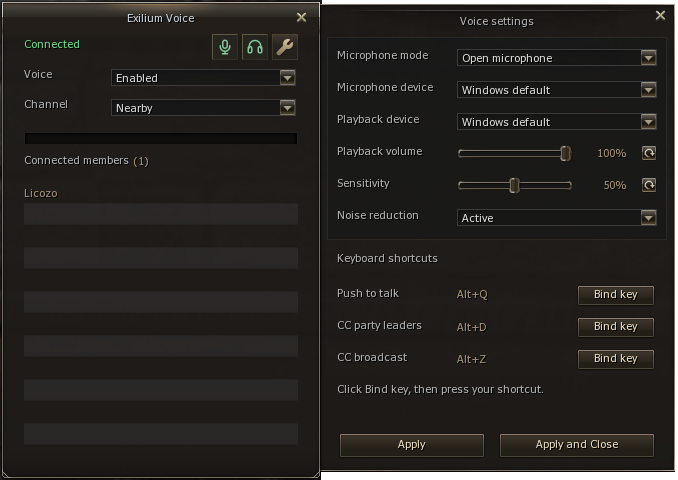
How to access
Click Voice in the game menu or use Alt+I. On first use, the system starts in the Nearby channel, with the microphone disabled and audio playback enabled. You can just listen or enable the microphone whenever you want.
Available channels
-
Nearby: talk with players near your character.
-
Party: communication between members of your party.
-
Clan: communication between clan members, with permission control to speak.
-
Command Channel: organized communication between CC parties.
You speak and listen in the selected channel. To talk to each other, players need to select the same channel corresponding to the group.
Communication in the Command Channel
With the Command Channel selected, your normal speech is directed to your own party. To coordinate the groups, there are two special shortcuts:
-
Alt+D: while holding the shortcut, the party leader speaks with the other CC party leaders. This transmission is not sent to the other members of your party.
-
Alt+Z: while holding the shortcut, the Command Channel leader speaks with all participants connected to the CC voice channel.
Choose how to use the microphone
-
Push to talk: hold a key to speak. The default shortcut is Alt+Q.
-
Voice detection: the microphone transmits automatically when it detects your speech.
-
Open microphone: keeps transmission open while the microphone is enabled.
Speech shortcuts can be customized through the Bind key button in the settings.
Controls and audio quality
The window shows the members connected to the channel and a bar with the microphone level. In the upper icons, you can mute the microphone or mute both the microphone and audio together.
In the settings, choose the input and output devices and adjust the volume and sensitivity. We also added noise reduction, with an option to disable it for comparison.
Click Apply to save your preferences per character.
New clan permission
We added “Can speak in clan voice” to the clan rank privileges system.
The leader can configure this permission in the ranks and assign them to members, using the existing permissions system. Members with the permission can speak in the clan voice channel; the others can join and listen normally. The clan leader retains permission to speak.